File:Bconomy-guide-24-opening-the-console.png


Size of this preview: 200 × 278 pixels.
Original file (200 × 278 pixels, file size: 47 KB, MIME type: image/png)
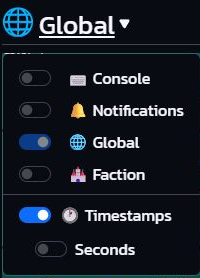
Figure 24 Opening the Console. Open the chat panel heading and choose Console. The switches beside channel names control split panels; selecting the Console name opens that channel.
Source
Extracted without alteration from Shadybliss's Bconomy New Users Guide Illustrated Revised, illustrated edition dated 24 October 2026.
This is a Bconomy local development-account screenshot. Balances, quantities and timers are examples, not targets.
Used on Settings community and support.
File history
Click on a date/time to view the file as it appeared at that time.
| Date/Time | Thumbnail | Dimensions | User | Comment | |
|---|---|---|---|---|---|
| current | 18:49, 28 October 2026 | | 200 × 278 (47 KB) | Shadybliss (talk | contribs) | Screenshot from Shadybliss's illustrated new-user guide, dated 24 October 2026. Bconomy local development-account values are examples, not targets. Category:Guide screenshots |
You cannot overwrite this file.
File usage
The following page uses this file:
