File:Bconomy-guide-23-where-action-feedback-appears.png: Difference between revisions


Shadybliss (talk | contribs) m 1 revision imported: Import my illustrated new-user guide dated 24 October 2026 as linked topic pages, categories, redirects, and screenshot descriptions |
No edit summary |
||
| Line 6: | Line 6: | ||
This is a Bconomy local development-account screenshot. Balances, quantities and timers are examples, not targets. | This is a Bconomy local development-account screenshot. Balances, quantities and timers are examples, not targets. | ||
Used on [[Settings | Used on [[Guide:Settings Community and Support|Settings Community and Support]]. | ||
[[Category:Guide screenshots]] | [[Category:Guide screenshots]] | ||


Latest revision as of 21:51, 1 November 2026
Figure 23 Where action feedback appears. Settings > Gameplay > Action Info lets you show action output in Console, chat and popups. Keep Show in Console enabled to follow the feedback references used in this guide.
Source
[edit | edit source]

Extracted without alteration from Shadybliss's Bconomy New Users Guide Illustrated Revised, illustrated edition dated 24 October 2026.
This is a Bconomy local development-account screenshot. Balances, quantities and timers are examples, not targets.
Used on Settings Community and Support.
File history
Click on a date/time to view the file as it appeared at that time.
| Date/Time | Thumbnail | Dimensions | User | Comment | |
|---|---|---|---|---|---|
| current | 18:49, 28 October 2026 | 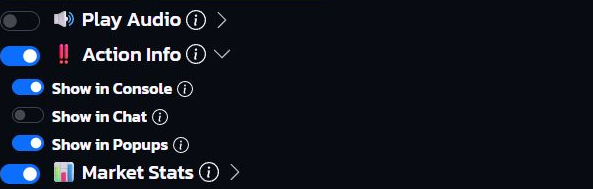 | 593 × 189 (67 KB) | Shadybliss (talk | contribs) | Screenshot from Shadybliss's illustrated new-user guide, dated 24 October 2026. Bconomy local development-account values are examples, not targets. Category:Guide screenshots |
You cannot overwrite this file.
File usage
The following page uses this file:
